SNGPL online bill check July 2026 is one of the fastest ways to access your Sui Northern Gas Pipelines Limited consumer bill without waiting for the printed copy. Many users search for Sui Gas bill check or gas bill online check when they want quick monthly billing details. If your printed bill is delayed, missing, or damaged, this digital method lets you view your payable amount, check the due date, and download a duplicate consumer copy within minutes. This service works for consumers across Lahore, Islamabad, Rawalpindi, Faisalabad, Multan, Peshawar, Gujranwala, Sialkot, and Sargodha, since SNGPL covers Punjab, Khyber Pakhtunkhwa, and Azad Jammu and Kashmir.
SNGPL Bill Online Check
Enter your SNGPL Consumer Number and check your bill.
Consumer Number or Account ID — Which One Do You Need?
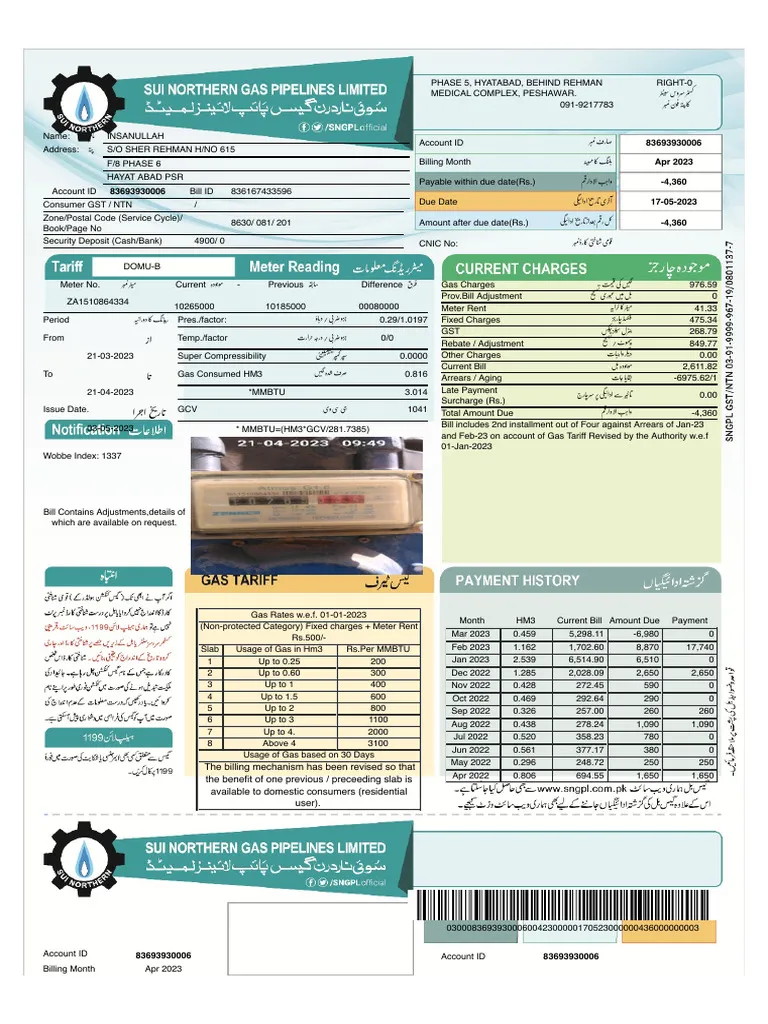
Many users get confused between “Consumer Number” and “Account ID” while trying to check their SNGPL bill. Both terms refer to the same 11-digit identifier for your gas connection. The online bill-check form on this page labels it as Consumer Number, but on your printed SNGPL bill, this same number often appears as Account ID near the top-right of the bill and is repeated on the payment slip. If you are checking a bill for a rented house, ask the owner or previous tenant for an older copy so you can find the correct number.
What is SNGPL, and Why Does It Matter for the Sui Gas Bill Check
Sui Northern Gas Pipelines Limited is one of Pakistan’s two major gas distribution companies. It supplies natural gas to domestic, commercial, and industrial consumers across Punjab, Khyber Pakhtunkhwa, Islamabad Capital Territory, and parts of Azad Jammu and Kashmir. Because of this wide coverage, most people in northern Pakistan refer to it simply as Sui Gas, which is why the term Sui Gas bill check is so commonly searched online. If your connection is in Sindh or Balochistan, this SNGPL tool will not work for you, since those areas fall under SSGC instead.
Moreover, the company manages a large number of active gas connections, and its billing system updates monthly. Therefore, knowing how to complete an SNGPL online bill check is essential for timely payment and account management.
Why SNGPL Online Bill Check Is the Smarter Choice in July 2026
Checking your gas bill online saves time and removes the frustration of waiting for paper delivery. Additionally, it gives consumers direct access to accurate billing information without visiting any office. For July 2026, SNGPL consumers should make it a habit to check their bills digitally because paper copies sometimes arrive after the payment due date.
Furthermore, digital access keeps a record that is easy to store, share, or print whenever needed. This is particularly useful for tenants, small business owners, and property managers who handle multiple utility accounts at one time.
Key Benefits of Checking Sui Gas Bill Online
- View your latest SNGPL bill anytime from any device
- Access a duplicate bill when the original copy is unavailable
- Confirm the exact payable amount before the due date arrives
- Review meter reading details and billing month in one place
- Download or print the consumer copy for payment or record purposes
- Avoid missed payments caused by late paper bill delivery
- Keep a secure digital copy for household or business accounts
How to Complete SNGPL Online Bill Check Step by Step
The process is straightforward and requires only your consumer number. Once you enter it correctly into the bill-check form, the latest bill appears immediately on the screen.
Step-by-Step Guide for Gas Bill Check Online
- Open the SNGPL online bill check page on checkyourbill.pk
- Locate the consumer number input field on the page
- Enter your consumer number exactly as printed on an older gas bill
- Click the submit or check button to proceed
- Complete the captcha on the official SNGPL page if prompted
- Review the billing month, due date, and total payable amount
- Download or print the duplicate bill copy if required
Before submitting, always double-check the consumer number. Even one incorrect digit will prevent the bill from loading properly.
Where to Find Your Consumer Number for the Sui Gas Bill Check
Many first-time users find it confusing to locate their SNGPL consumer number. However, it is printed clearly on any previous month’s gas bill, usually near the customer details section at the top, and repeated on the payment slip. You do not need to register or create an account to access the duplicate bill online.
Quick Tips to Locate the Consumer Number
- Check the top section of any previous SNGPL gas bill
- Look for the field labeled consumer number or account ID
- Enter the number exactly as printed, without spaces or symbols
- Avoid using reference numbers or meter numbers instead
- Confirm the digits carefully before clicking submit
If you cannot find any previous bill, contact the SNGPL helpline to retrieve your consumer number from their records.
What details appear on the SNGPL duplicate bill
After your bill opens, you can review all important billing information. This helps you pay the bill, save records, and compare monthly usage.
Bill Detail | What It Means | Why It Matters |
|---|---|---|
Consumer Number | Your gas account identification number | Needed for online bill check |
Billing Month | Month for which bill is issued | Helps track latest bill |
Due Date | Last date to pay normally | Helps avoid late surcharge |
Payable Amount | Amount due for payment | Needed for online or offline payment |
Meter Reading | Current and previous reading details | Shows gas consumption |
Gas Charges | Cost of consumed gas | Main usage-based charge |
Fixed Charges | Monthly fixed billing component | Can affect low-usage bills |
Meter Rent | Meter-related monthly charge | Adds to the total bill |
GST | Government tax component | Included in final amount |
Arrears | Previous unpaid balance | Can increase the payable amount |
Consumer Copy | Printable duplicate bill | Used for payment and record keeping |
An SNGPL bill can include gas charges, meter rent, fixed charges, GST, arrears, and late payment surcharge. If your bill amount looks unusually high, it may be linked to your protected or non-protected consumer category, winter usage averaging, or a billing adjustment.
How to Download and Print the SNGPL Duplicate Bill for July 2026
After viewing the bill, you can easily save or print it. This is especially helpful if you plan to pay at a bank branch, collection counter, or any offline payment point.
Simple Steps to Save Your Gas Bill Copy
- Open your SNGPL bill on the online bill-check page
- Use the browser’s print option or download button
- Save the bill as a PDF file on your phone or computer
- Print the consumer copy from a printer connected to your device
- Store a soft copy in a folder for future monthly reference
Saving a PDF copy takes only a few seconds, and it ensures you always have the bill available even without internet access later.
SNGPL Bill Payment Options After Sui Gas Bill Check
Once you confirm the payable amount, the next step is payment. Today, multiple convenient options are available for Pakistani gas consumers. You can pay online using mobile banking or digital wallets, which is the fastest method. Alternatively, you can also use traditional bank branches and collection points.
Payment Method | Convenience | Best Suited For |
|---|---|---|
Mobile Banking Apps | Very High | Quick payments from home |
Internet Banking | Very High | Online bank account users |
JazzCash / Easypaisa | High | Mobile wallet users |
ATM Machine | Medium | Card-based bill payment |
Bank Branch Counter | Medium | In-person payment preference |
SNGPL Collection Point | Medium | Local area consumers |
For those who prefer a more detailed walkthrough of the transaction process, we have a guide on how to pay SNGPL bill online for all users. Using digital wallets like EasyPaisa or JazzCash is also a very popular choice for many residents because of their wide accessibility. These platforms often provide instant confirmation receipts, which serve as valid proof of payment in case of any future billing disputes. Always ensure that you save the transaction ID or take a screenshot of the success message after finishing the payment.
Always save the payment confirmation, transaction slip, or screenshot after completing your gas bill payment.
Common Problems During SNGPL Online Bill Check and How to Fix Them
Sometimes the bill does not load on the first attempt. Fortunately, most problems have simple solutions that you can apply quickly without calling customer support.
Reasons Why the Bill May Not Appear
- The consumer number or account ID was entered incorrectly
- The captcha on the official SNGPL page did not load
- The internet connection is slow or unstable
- The website is temporarily experiencing loading issues, especially near due dates
- The July 2026 bill has not yet been uploaded to the system
- The browser cache is causing a display problem
How to Solve the Issue Quickly
- Compare all 11 digits of your consumer number with an older bill
- Refresh the official SNGPL page if the captcha does not load, or try another browser
- Switch to a different browser or device
- Clear the browser cache and cookies before retrying
- Wait a few hours if the latest monthly bill is still being processed
If the problem continues after these steps, check an older bill again to confirm the number, or contact SNGPL through the official helpline for further assistance.
Analyzing Your Gas Consumption and Charges
Once your bill is visible, it is important to look beyond just the total amount due to understand your usage. The bill includes details about the gas units consumed, which are measured in cubic meters and then converted into billing units. You will also see various taxes, including General Sales Tax and other government levies that are mandatory for all consumers. Understanding these components helps you realize how much you are paying for the actual gas versus the secondary government taxes.
If you find that your units are significantly higher than expected, you might want to learn how to reduce sui gas bill through efficient appliance usage. Small changes in how you use your water heater or stove can lead to substantial savings over a long period. Many people realize that their bills stay high because of old appliances or minor leaks that go unnoticed during the day.
Who Benefits Most from SNGPL Online Bill Access
This service is practical for a wide range of consumers across Lahore, Islamabad, Rawalpindi, Faisalabad, Multan, Peshawar, Gujranwala, Sialkot, and Sargodha, not just households. Almost anyone with an SNGPL connection can benefit from checking the gas bill online.
Users Who Find This Most Useful
- Households that did not receive the printed bill on time
- Tenants who need a quick copy for rental records
- Property owners managing multiple gas connections
- Small shop owners tracking monthly utility expenses
- Office managers maintaining proper expense records
- Consumers who prefer online utility bill management
Because digital access is available around the clock, it suits users who cannot visit offices during regular working hours.
Frequently Asked Questions
You can complete your SNGPL online bill check by entering your consumer number into the bill-check form on this page. After submission, the latest bill details for July 2026 appear on your screen instantly.
Yes. Consumer Number and Account ID refer to the same 11-digit identifier for your gas connection. The bill-check form uses the term Consumer Number, while your printed bill may label it as Account ID.
Yes, this page works for SNGPL consumers across Lahore, Islamabad, Rawalpindi, Faisalabad, Multan, Peshawar, Gujranwala, and Sialkot, since all of these cities fall under SNGPL’s coverage area.
Yes, you can view the bill online and then save it as a PDF or print the consumer copy directly from your phone or computer for payment and record purposes.
This can happen because of an incorrect consumer number, a captcha that failed to load, slow internet, temporary server issues, or because the July 2026 bill is not yet available in the system. Try again after rechecking your number and refreshing the page.
If your bill contains billing errors, wrong meter readings, or unexplained charges, you should contact the official SNGPL customer support team directly. The online bill-check page is only for accessing duplicate bills and cannot handle account disputes.
No, SNGPL covers Punjab, Khyber Pakhtunkhwa, Islamabad, and Azad Jammu and Kashmir. If your connection is in Sindh or Balochistan, you should use the SSGC bill-check tool instead.
Conclusion
SNGPL online bill check July 2026 gives gas consumers across Punjab, Khyber Pakhtunkhwa, Islamabad, and Azad Jammu and Kashmir a simple, fast, and reliable way to manage monthly billing without depending on printed copies. By entering your consumer number, you can view your latest Sui Gas bill, confirm the payable amount, and save a duplicate copy within moments.
With several digital payment options now available, including mobile banking apps and digital wallets, paying your gas bill on time has never been easier. For further reading, explore how to pay the SNGPL bill online and learn about reducing your Sui Gas bill for practical money-saving tips.
Also Check: SSGC Online Bill Check July 2026