HAZECO Online Bill Check 2026
HAZECO online bill check makes it easy to view your latest electricity bill without waiting for the printed copy. If your original bill has been delayed, misplaced, or not delivered, you can use this page to access your HAZECO duplicate bill, review the payable amount, check the due date, and download or print a copy for your records.
Hazara Electric Supply Company (HAZECO) is a major electricity distribution company serving consumers in the Hazara region of Pakistan. Its official platform offers digital services such as bill tracking, payment reminders, complaint filing, and account-related support through its web and mobile ecosystem. Because of this growing digital setup, online bill access is one of the easiest ways for HAZECO consumers to stay updated on monthly billing information.
Most consumers can check their bill online using a 14-digit reference number. The PITC HAZECO bill page also supports Customer ID, which gives users another way to retrieve the latest bill details. Once the correct information is entered, your current bill can usually be viewed within seconds.
Check HAZECO Bill Online
Hazeco Bill Check Online
Hazeco Bill Check Online
Check your electricity bill online
اپنا بجلی کا بل چیک کریں
Important: This page is designed to help users access duplicate bill information online. For official complaints, billing disputes, feeder issues, or account-related matters, use the relevant official support and complaint channels.
How to Check Your HAZECO Bill Online
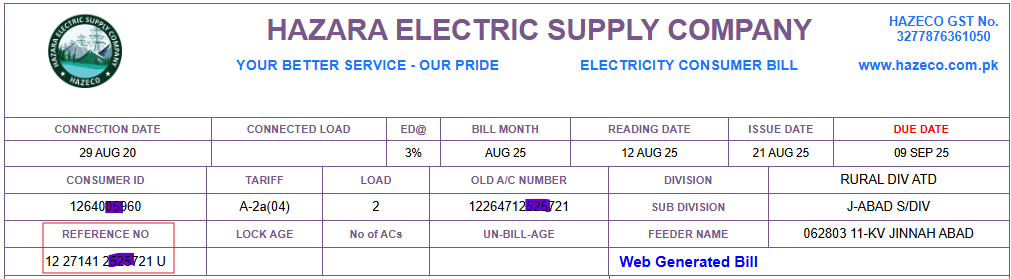
To check your HAZECO bill online, you usually need your 14-digit reference number. In many cases, Customer ID may also work if supported by the bill checker. These details are printed on your previous electricity bill and can be used to retrieve the latest bill information online.
If you are not sure where to find your reference number, check the highlighted area on your old bill or visit your related bill help guide page for additional assistance.
Step-by-Step Guide
- Open the bill checker: Use the HAZECO bill checking form available on this page.
- Enter your bill details: Type your 14-digit reference number or customer ID carefully.
- Click the Check Bill button: Submit your details to load the latest bill information.
- Review the bill: You can see the bill amount, billing month, due date, and other important billing details.
- Download or print your duplicate bill: Save the bill on your device or print it for payment or record-keeping purposes.
What Details Are Available on a HAZECO Duplicate Bill?
When you open your HAZECO duplicate bill, it usually includes the following information:
- Consumer name
- Reference number
- Customer ID
- Billing month
- Due date
- Total payable amount
- Units consumed
- Meter reading details
- Taxes, duties, and surcharges
- Amount payable after the due date
These details help consumers confirm the exact amount due, review electricity usage, and avoid late payment charges.
How to Find Your HAZECO Reference Number or Customer ID
The reference number is the most commonly used detail for checking a HAZECO bill online. It is a unique 14-digit number printed on your previous electricity bill, usually near the top section. The PITC HAZECO bill page also accepts Customer ID, which can be useful if that is easier for you to access.
Keeping an older bill copy is helpful whenever you need to verify your latest bill details quickly.
HAZECO Duplicate Bill Download and Print
If your monthly bill has not arrived, you can still get a HAZECO duplicate bill download online. This allows you to check the due date, confirm the payable amount, and print a copy if needed for payment or personal records.
Online duplicate bill access is especially useful for consumers who prefer digital records or need an urgent bill copy before the due date.
Can You Check a HAZECO Bill with CNIC?
In most cases, HAZECO bill check by CNIC is not the standard method for viewing duplicate bills online. Regular bill viewing is usually done through the reference number or customer ID. However, the complaint system may use CNIC-linked verification fields during complaint handling.
Can You Pay a HAZECO Bill Online?
Yes, HAZECO bills can usually be paid through mobile banking apps, internet banking services, ATM networks, digital wallets, bank branches, and other utility bill payment channels available in Pakistan. Before making a payment, always verify your bill amount, due date, and reference number carefully.
HAZECO Bill Payment Methods in Pakistan
After checking your HAZECO duplicate bill online, you can pay it through several payment methods available across Pakistan. Both online and offline options are commonly used, which makes bill payment convenient for all types of consumers. Many users prefer digital payment methods because they are fast, simple, and available at any time, while traditional payment channels are still useful for people who prefer to pay in person. Pakistan’s 1LINK 1BILL network also supports utility bill collection through banks and non-banks across OTC and digital channels.
- Mobile banking apps: Many banks in Pakistan allow users to pay HAZECO bills directly through their official mobile apps.
- Internet banking portals: Consumers can log in to their online banking accounts and pay electricity bills securely.
- ATMs: Utility bill payment is also available through many ATM networks across Pakistan.
- Digital wallets: Services such as JazzCash and Easypaisa are widely used for quick electricity bill payments.
- Authorized bank branches: Consumers can visit participating bank branches and pay their HAZECO bills over the counter.
- Pakistan Post offices: In many areas, electricity bills can also be paid at selected post office counters.
- Bill receiving agents and retail payment shops: Many local payment collection points and agent counters also accept utility bill payments.
Before making a payment, always check your bill amount, due date, and reference number carefully. If you want faster processing and easier record-keeping, digital payment methods are usually the most convenient option. If you prefer in-person payment, bank branches, post offices, and authorized bill collection centres remain reliable choices.
Common Issues While Checking HAZECO Bill Online
Some users may face temporary issues while trying to access their duplicate bill online. In most cases, these problems can be solved by checking the entered number again or trying again later.
- Invalid reference number: Make sure all 14 digits are entered correctly.
- Bill not loading: Refresh the page and try again after a short delay.
- Incorrect bill details: Compare the entered number with an older bill copy.
- Latest bill not showing: The current billing cycle may not yet be updated in the system.
- Payment uncertainty: Confirm the bill amount and due date before paying online or offline.
HAZECO Complaints and Customer Support
If you are facing a high bill, incorrect meter reading, billing dispute, or electricity supply issue, the duplicate bill checker may not be enough. The PITC complaint system supports complaint registration using a 14-digit reference number or mobile number. Consumers can also track complaints by reference number or ticket number.
For guidance, visit our support page: HAZECO Helpline and Customer Service.
Before contacting support, keep your reference number and relevant bill details ready so your issue can be traced more easily. The official complaint/help system also publishes contact channels such as 118, 8118, and [email protected].
HAZECO Online Services Overview
| Service | Online Availability | Offline Availability |
|---|---|---|
| Bill Checking | Yes | No |
| Duplicate Bill Download | Yes | Limited through customer service offices |
| Bill Print | Yes | Yes |
| Bill Payment | Yes, through banking apps and payment services | Yes, at banks, post offices, and payment counters |
| Complaint Registration | Available through official complaint channels | Yes, at service offices |
| Consumer Support Services | Depends on service type | Yes |
Why Use Online HAZECO Bill Check?
- No need to wait for the printed bill
- A duplicate bill is available within seconds
- Due date and payable amount can be checked quickly
- Easy access on mobile, tablet, and desktop devices
- Bills can be downloaded, saved, and printed anytime
Frequently Asked Questions
You can check your HAZECO bill online by entering your 14-digit reference number or customer ID in the bill checker and clicking the Check Bill button.
Yes, you can view, download, save, and print your HAZECO duplicate bill online after entering the correct bill details.
Check your reference number carefully, refresh the page, and try again later. If the issue continues, verify your details using an older bill copy or contact support.
Yes, if you are facing a high bill, meter issue, or billing dispute, you should use the relevant complaint or customer support channel for assistance.
HAZECO bills can usually be paid through mobile banking apps, internet banking portals, ATMs, digital wallets, and other utility payment channels available in Pakistan.
Online HAZECO duplicate bill checking is generally done through the reference number or customer ID, not CNIC.
Conclusion
HAZECO online bill check is one of the easiest ways to access your electricity bill when the printed copy is delayed, missing, or unavailable. It allows consumers to review their bill amount, due date, and other important billing details without visiting an office.
You can use this page to view and download your HAZECO duplicate bill. If you also need help finding your bill details or contacting support, you can read your related guide page, visit HAZECO Helpline and Customer Service, or go back to the homepage to check other electricity bills online.