Paying utility bills through mobile wallets has become one of the easiest ways to manage monthly expenses in Pakistan. If you are looking for a way to handle your monthly costs without visiting a bank, learning how to pay electricity bill online using NayaPay is the best solution. Many residents often search for terms like Fesco online bill or Lesco online bill to find their current dues. Whether you need a quick FESCO bill check or a detailed Lesco bill breakdown, the transition to digital platforms ensures you never miss a deadline. This guide provides a comprehensive look at using the NayaPay app for various providers including Mepco bill, Iesco bill, and even KE bill check requirements. By utilizing these digital services for Mepco or Iesco bill payments, you save precious time and avoid the hassle of long queues at physical collection centers.
Why Choose NayaPay for Bill Payments?
Selecting a reliable fintech partner is crucial for secure financial transactions in Pakistan. NayaPay stands out because it offers a seamless interface that integrates directly with major power distribution companies. When you perform an electricity bill check through this app, you receive instant updates and digital receipts that serve as valid proof of payment.
Benefits at a Glance
| Feature | Benefit to Consumer |
|---|---|
| Instant Confirmation | Receive a digital receipt immediately after the transaction. |
| 24/7 Availability | Pay your dues anytime, even on public holidays or at midnight. |
| Multiple Billers | Supports LESCO, FESCO, MEPCO, IESCO, K-Electric, Sui Gas Bill, and more. |
| User-Friendly UI | Simple navigation makes it easy for even non-technical users. |
| Single App Access | Manage electricity, gas, water, and internet bills in one place. |
| Compliance Standards | Certified with PCI DSS and ISO 27001 for maximum data protection. |
| Smart Notifications | Automated alerts for upcoming due dates to prevent late fees. |
| Zero Hidden Fees | Transparent transaction history with no unexpected service charges. |
Prerequisites
Before you proceed with the actual payment process, ensure you have everything ready to avoid interruptions during the digital transaction phase. Having these items prepared will make the experience smooth and efficient while you are navigating the mobile wallet interface for the first time.
- An active NayaPay account that has completed the full CNIC verification process.
- Sufficient balance in your wallet to cover the total bill amount including any applicable government taxes.
- The 14-digit reference number which is clearly printed on your hard copy or available via an online electricity bill check.
- A stable internet connection to prevent any technical timeouts during the sensitive authentication phase.
- The most recent version of the NayaPay app installed from the Google Play Store or Apple App Store.
Step-by-Step Guide to Paying Your Electricity Bill Using NayaPay
Follow these clear instructions to complete your payment in under two minutes. Each step builds naturally on the previous one, so the process flows effortlessly.
Step 1: Open the NayaPay App and Log In
- Launch the NayaPay app on your phone.
- Then enter your MPIN or use fingerprint or Face ID for quick access.
- New users simply sign up by scanning their CNIC and verifying their number. This initial login takes only seconds.
Step 2: Navigate to Bill Payments
- After opening the app, look for the bill payment option on the home screen or in the payment menu.
- This section is used for utility and other bill payments. Tap it to continue.


Step 3: Select Electricity and Your Provider
- Choose “Electricity” from the category list.
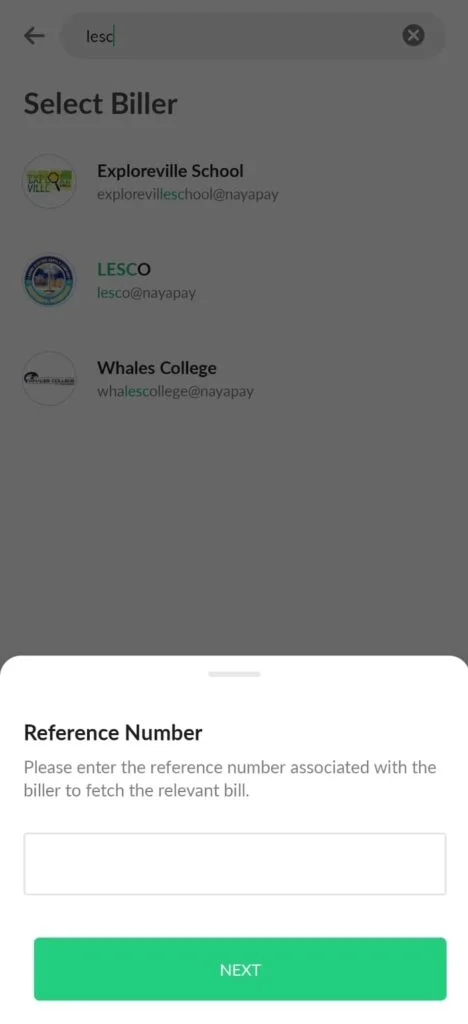
- Next, pick your specific provider such as FESCO, LESCO, MEPCO, IESCO, or K-Electric.
- NayaPay supports most DISCOs across Pakistan, therefore you rarely face compatibility issues.
Step 4: Enter Bill Details
- Input the 14- or 15-digit reference number exactly as shown on your bill.
- Tap “Fetch Bill” or “Next” to pull up the latest details automatically.
- Review the consumer name, due amount, and billing period carefully.
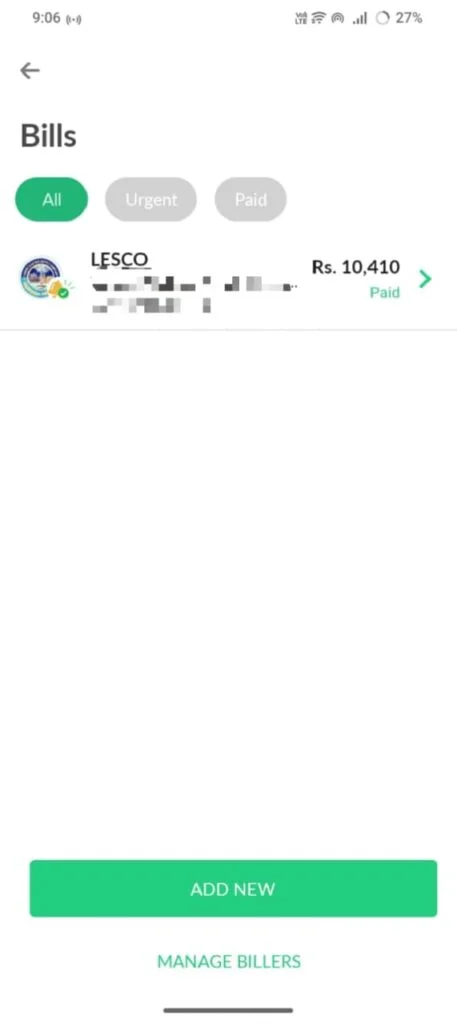
Step 5: Confirm and Complete Payment
- Verify that all information matches your bill. Then enter the payment amount, usually the full due sum.
- Finally, confirm with your MPIN or biometric authentication. The system processes instantly and shows a success screen with a transaction ID.
Step 6: Save Your Receipt
- Download the digital receipt or take a screenshot for your records. This proof helps if any provider update takes up to 24 hours.
- Additionally, you can scan a QR code on your bill using the Quick Pay feature for even faster results. Thus, the entire flow feels seamless every time.
Other Bill Payment Methods
While NayaPay offers excellent convenience, several alternatives exist for online electricity payment via NayaPay or similar platforms. For instance, many users rely on EasyPaisa or JazzCash apps because they also fetch bills quickly.
Bank mobile apps from HBL, UBL, or Meezan provide direct transfers, yet they sometimes require extra login steps. Furthermore, you can visit ATM machines or authorized agents for cash payments.
However, these options often involve longer queues or higher fees compared to digital wallets. A quick comparison appears below:
| Method | Speed | Convenience | Fees | Best For |
|---|---|---|---|---|
| NayaPay App | Instant | High | Usually free | Everyday users |
| EasyPaisa/JazzCash | Instant | High | Low | Mobile-first users |
| Bank Apps | 1-2 minutes | Medium | Varies | Account holders |
| ATM/Cash | Same day | Low | Possible | Those without smartphones |
Therefore, choose based on your daily routine, but NayaPay consistently ranks high for speed and simplicity.
Supported Electricity Distribution Companies on NayaPay
NayaPay covers all major DISCOs across Pakistan, making it a one-stop solution for every household. Here is a complete table of supported providers:
| Distribution Company | Region Covered |
|---|---|
| LESCO | Lahore and surrounding areas |
| FESCO | Faisalabad Division |
| MEPCO | Multan and South Punjab |
| IESCO | Islamabad and Rawalpindi |
| K-Electric (KE) | Karachi and surrounding areas |
| GEPCO | Gujranwala Division |
| HESCO | Hyderabad and Sindh |
| PESCO | Peshawar and KPK |
| SEPCO | Sukkur and upper Sindh |
| QESCO | Quetta and Balochistan |
FAQs
Usually, the provider reflects the payment within 24 hours. However, you receive instant confirmation in the app, so you know the transaction succeeded right away.
Most bill payments remain free of charge. Still, always check the final screen before confirming because rare provider-specific charges may apply.
Yes, NayaPay operates 24/7. Consequently, you settle your dues anytime without waiting for bank hours.
You may be able to pay it, but a late payment surcharge may apply depending on the electricity provider. It is always better to pay before the due date.
Link your bank account or visit a partner outlet for cash deposit. Transfers via Raast complete instantly, therefore your balance stays ready for immediate use.
How to Contact NayaPay Support
You can reach NayaPay’s support team 24/7 via in-app chat, by emailing [email protected], or by calling +(9221) 111-222-729. Additionally, if your reference number fails to fetch bill details, double-check for any typos and then contact support via in-app chat or call 0300-000-0927.
| Support Channel | Details |
|---|---|
| In-App Chat | Available 24/7 inside the NayaPay app |
| Phone Support | +(9221) 111-222-729 |
| Alternate Helpline | 0300-000-0927 |
| Email Support | [email protected] |
Conclusion
Paying your electricity bill online has become a simple, stress-free task thanks to platforms like NayaPay. Whether you are managing a Fesco online bill in Faisalabad, checking your Lesco online bill in Lahore, or settling your KE Bill in Karachi, NayaPay brings all your utility payments under one roof. The process is quick, the app is secure, and the support is available around the clock. So, the next time your electricity bill is due, skip the queue, open NayaPay, and get it done in minutes. Your time is valuable — use it wisely.